
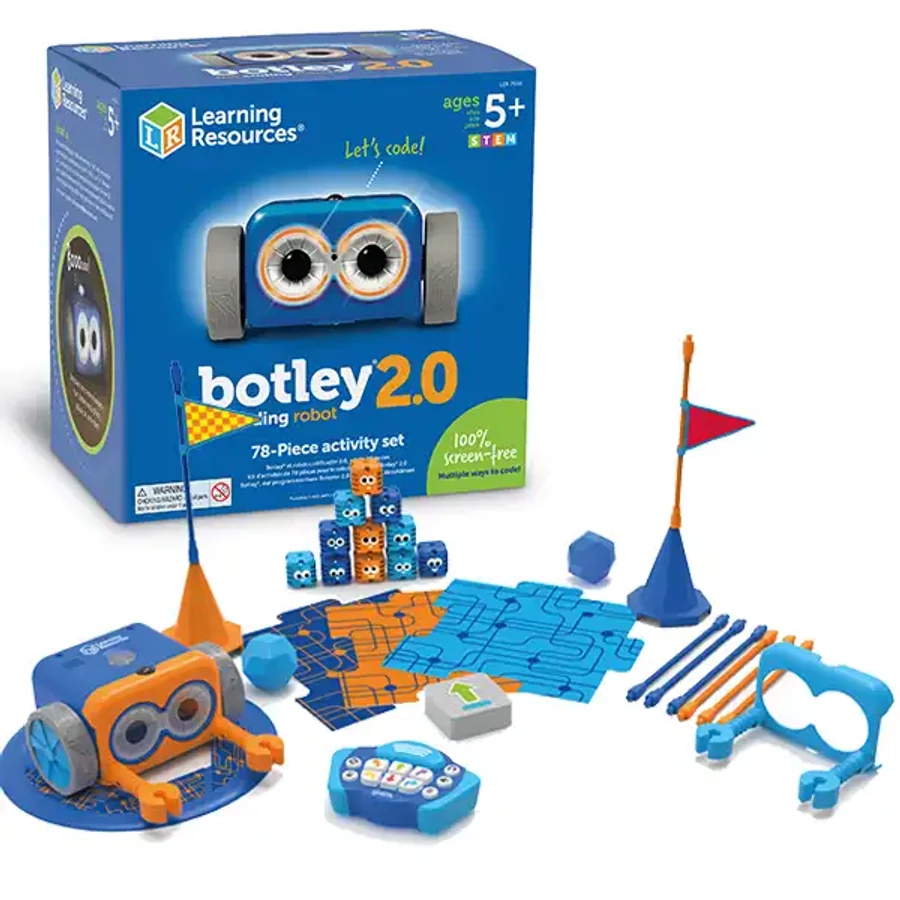
Why Botley works well at ages five and six
Learning Resources currently rates Botley 2.0 for ages 5+. The key advantage is immediate feedback: children use the remote programmer to create a route and Botley physically performs it. A wrong turn becomes a debugging problem the child can see rather than an abstract error message.
What children actually practice
The activity set supports sequencing, spatial reasoning, prediction and debugging first. As the child progresses, Botley can introduce loops, object-sensing reactions, six movement directions, 45-degree turns and longer programs. Learning Resources says Botley 2.0 can store sequences up to 150 steps. That progression is why it has more replay value than a one-button robot that simply performs preset actions.
Strengths
- 100% screen-free programming with no app or account
- Fast first success for early elementary beginners
- Enough advanced behavior to grow past one-step commands
- Activity set includes coding cards, obstacles and building pieces for child-created routes
Tradeoffs
- Requires five AAA batteries; they are not included
- Needs floor or table space for routes
- Physical accessories need storage and organization
- It teaches programming logic, not text-based coding syntax
Botley at age 5 vs. age 6
For many five-year-olds, start with short straight-line routes and one visible obstacle. At six, extend the challenge: predict the entire route before pressing go, use loops, add turns or require a second solution. The hardware does not need to change—the difficulty comes from the problem the child is asked to solve.
Safety and setup
The activity set contains 78 pieces and requires five AAA batteries. Keep the battery compartment secured, follow the manufacturer battery instructions and store coding cards and small accessories away from younger siblings after play.
Who should skip it?
Skip Botley if the child specifically wants construction, electronics or app-based block coding; it is strongest as a sequencing-and-debugging robot. A child who already finds long screen-free sequences easy may get more growth from Dash, mBot2 or another system with broader programming and sensor options.
Verdict
Botley 2.0 remains one of the cleanest first coding-robot choices for ages five and six because the learning loop is visible, fast and independent of an app. Its value comes from turning increasingly complex routes into debugging problems—not from pretending a young child needs advanced AI.